<?xml version="1.0" encoding="utf-8"?><?xml-stylesheet type="text/xsl" href="atom.xsl"?>
<feed xmlns="http://www.w3.org/2005/Atom">
    <id>https://yadan.net/blog/</id>
    <title>Omry Yadan Blog</title>
    <updated>2026-05-18T00:00:00.000Z</updated>
    <generator>https://github.com/jpmonette/feed</generator>
    <link rel="alternate" href="https://yadan.net/blog/"/>
    <subtitle>Omry Yadan Blog</subtitle>
    <icon>https://yadan.net/img/favicon-v2.svg</icon>
    <entry>
        <title type="html"><![CDATA[Introducing Backlog Atlas]]></title>
        <id>https://yadan.net/blog/introducing-backlog-atlas/</id>
        <link href="https://yadan.net/blog/introducing-backlog-atlas/"/>
        <updated>2026-05-18T00:00:00.000Z</updated>
        <summary type="html"><![CDATA[A short introduction to Backlog Atlas, a self-hosted backlog dashboard for GitHub maintainers.]]></summary>
        <content type="html"><![CDATA[<p>Backlog Atlas started from a maintainer problem I ran into when I recently
started maintaining OmegaConf and Hydra again. Both projects are widely used,
but they had been under-maintained for years. Over time, issues accumulated,
pull requests piled up, and the backlog became hard to reason about.</p>
<p>With hundreds of issues and pull requests across both repositories, tackling the
work directly felt almost impossible. Backlog Atlas came from needing a way to
make that backlog visible enough to act on.</p>
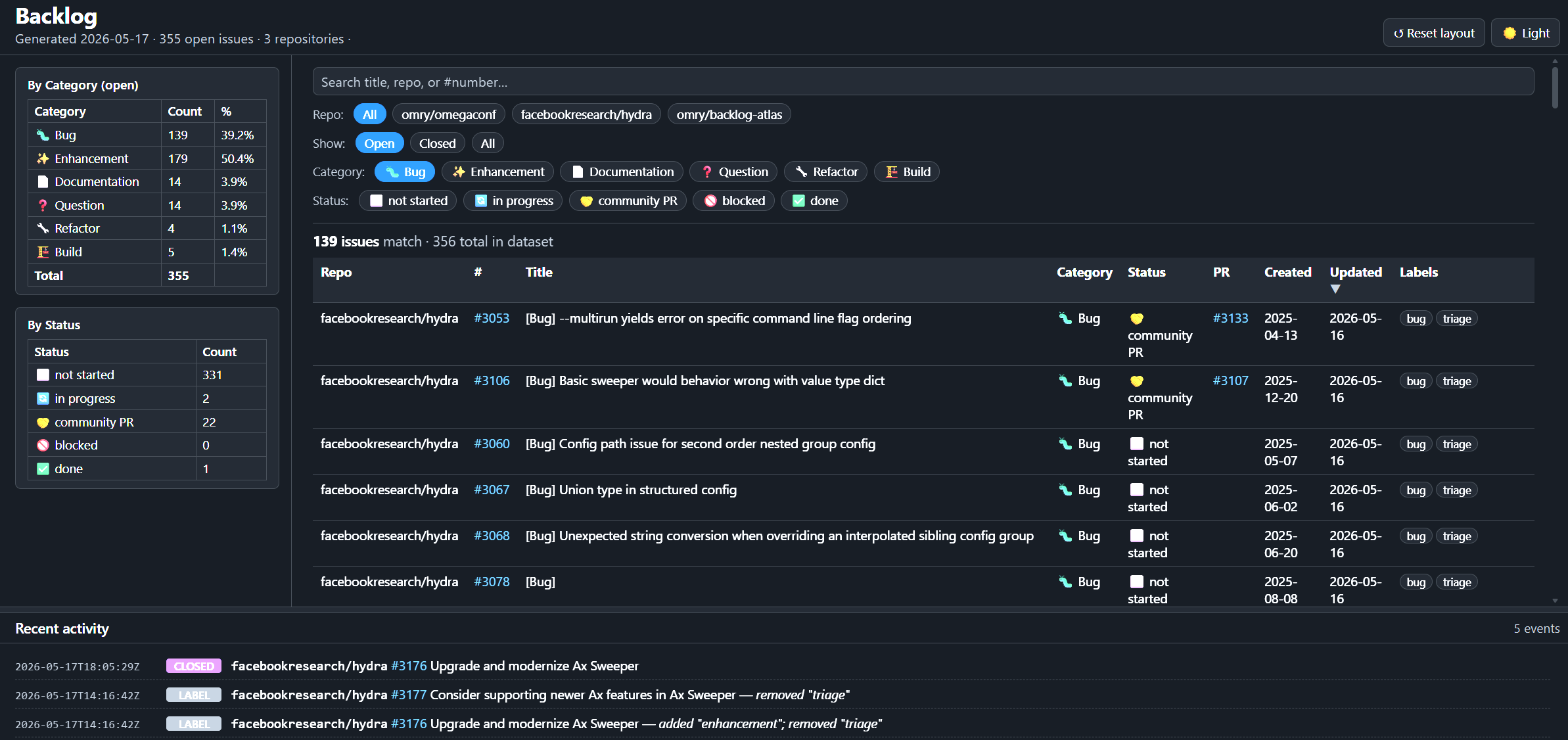
<p><a href="https://yadan.net/img/projects/backlog-atlas/dashboard.png"><img src="https://yadan.net/img/projects/backlog-atlas/dashboard.png" alt="Backlog Atlas dashboard showing backlog summary tables, filters, issue rows, and recent activity" width="720"></a></p>
<p>For projects like Hydra and OmegaConf, the backlog is not just a private todo
list. It is part of the project surface. Contributors look at it to understand
what is happening, users look at it to guess whether something is alive, and I
look at it when deciding where attention should go next.</p>
<p>Backlog Atlas collects open issues and pull requests from one or more GitHub
repositories and turns them into a searchable dashboard. It shows what is
waiting, what changed recently, how issues are distributed across bugs,
enhancements, and other categories, and which pull requests need attention.</p>
<p>It publishes that view as static files through GitHub Pages. There is no server
to run, no database to maintain, and no hosted product account in the middle.</p>
<p>That shape is deliberate. For open-source maintenance, boring deployment is a
feature: generated data should be visible, reviewable, and easy to remove if the
tool stops earning its keep.</p>
<p>The first public version already supports a browser-federated atlas view: each
repository publishes its own <code>backlog.json</code>, and one static dashboard can load
multiple downstream repositories and merge them locally in the browser.</p>
<p>The product is in the right shape now, including <code>backlog-atlas atlas install</code>
for batch installing or upgrading all tracked repositories. From here it will
evolve as I use it further and start to receive user feedback.</p>
<p>You can see this repository's dashboard at
<a href="https://omry.github.io/backlog-atlas/" target="_blank" rel="noopener noreferrer" class="">omry.github.io/backlog-atlas</a>, and the
project itself is on
<a href="https://github.com/omry/backlog-atlas" target="_blank" rel="noopener noreferrer" class="">GitHub</a> and
<a href="https://pypi.org/project/backlog-atlas/" target="_blank" rel="noopener noreferrer" class="">PyPI</a>.</p>]]></content>
        <author>
            <name>Omry Yadan</name>
            <uri>https://yadan.net</uri>
        </author>
        <category label="engineering" term="engineering"/>
        <category label="projects" term="projects"/>
        <category label="open-source" term="open-source"/>
    </entry>
    <entry>
        <title type="html"><![CDATA[Building This Personal Website]]></title>
        <id>https://yadan.net/blog/building-this-personal-website/</id>
        <link href="https://yadan.net/blog/building-this-personal-website/"/>
        <updated>2026-05-14T00:00:00.000Z</updated>
        <summary type="html"><![CDATA[A short blog post on turning yadan.net into a small personal site for projects and writing.]]></summary>
        <content type="html"><![CDATA[<p>This first post is about making <code>yadan.net</code> into a small personal website:
enough structure for projects, blog, about, and contact, without turning it
into a full resume or a busy homepage.</p>
<p>This is not my first blog. I still have an unmaintained
<a href="https://firefang.net/blog/" target="_blank" rel="noopener noreferrer" class="">Hebrew blog</a> at <code>firefang.net</code>, where I posted between 2005 and 2016,
with the frequency slowly tapering off.</p>
<p>This one should be easier to sustain because it is not only a place to write.
It is also a small front door for the projects I keep returning to: Hydra,
OmegaConf, Rakia, HoodleFinance, and whatever comes next.</p>
<p>The goal is simple: keep a stable home for project context and occasional
writing, with contact available as a small standalone page, without turning the
homepage into a full resume or portfolio.</p>]]></content>
        <author>
            <name>Omry Yadan</name>
            <uri>https://yadan.net</uri>
        </author>
        <category label="engineering" term="engineering"/>
        <category label="projects" term="projects"/>
    </entry>
</feed>